The auto clicker you can set up without guesswork.
Tired of tapping the same buttons again and again? Place taps, long presses and swipes on the screen once, and Nagi Clicker runs them in order. No coding, no root, no account.
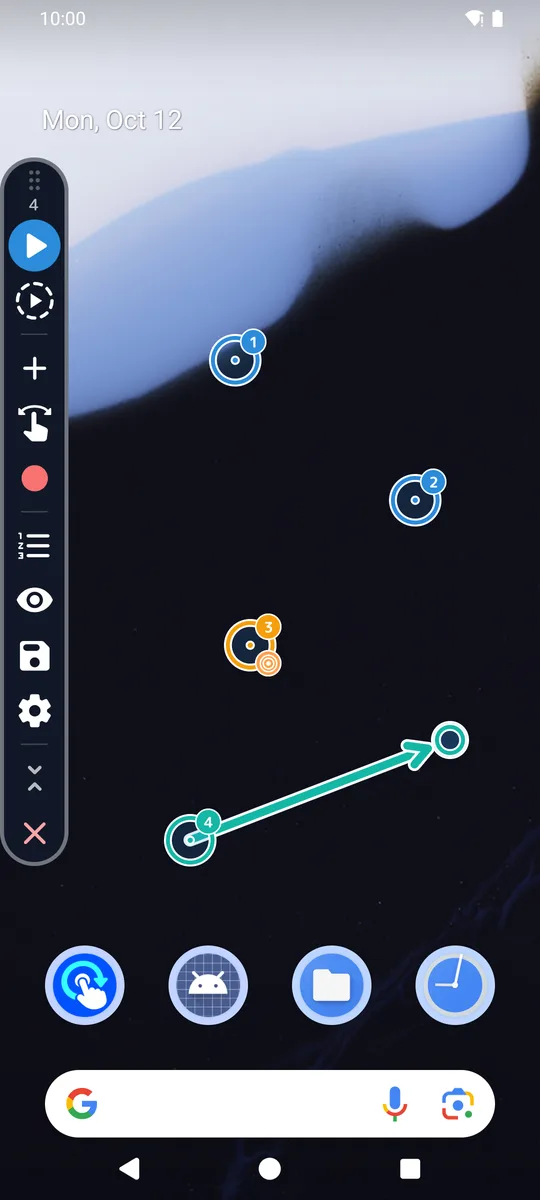
Make it the way you would do it
Three ways to build an automation, all on top of the app you want to automate.
Place it
Tap the screen where you want a point, then drag it into place. Switch a point between tap and long press. Swipes keep the exact curve you draw.
Record it
Do it once with your own finger. Nagi Clicker turns your taps and swipes into steps you can adjust afterwards.
Save it, open it in one tap
Saved automations stay on your phone, in the order you choose. Put one on your home screen as its own icon.
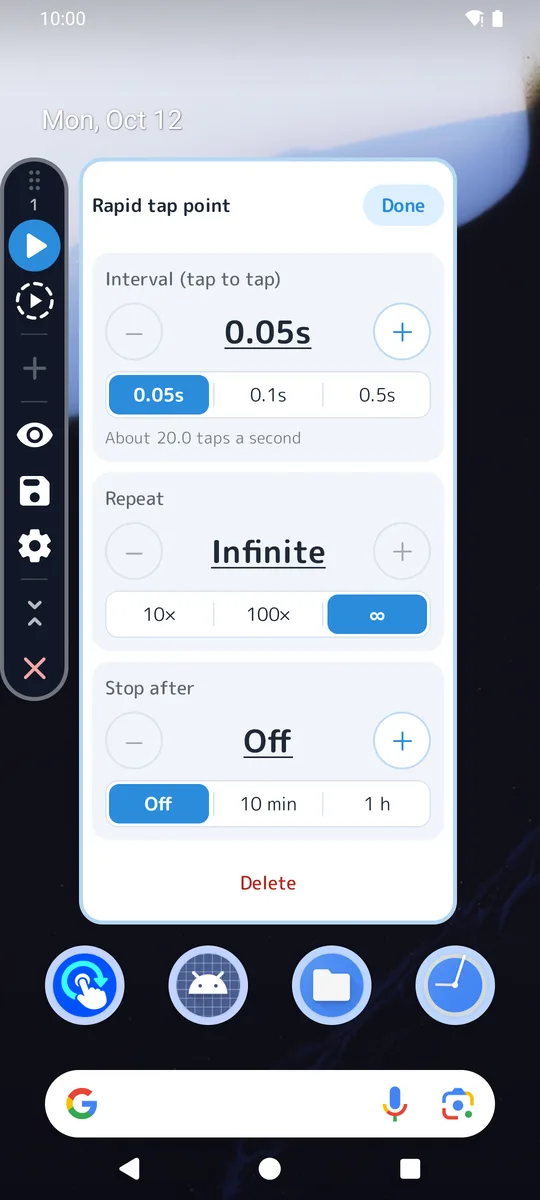
Rapid tap, every 0.05 seconds
Tap one spot again and again, up to about 20 taps a second. Set how many times, run without end, or stop after a set time.
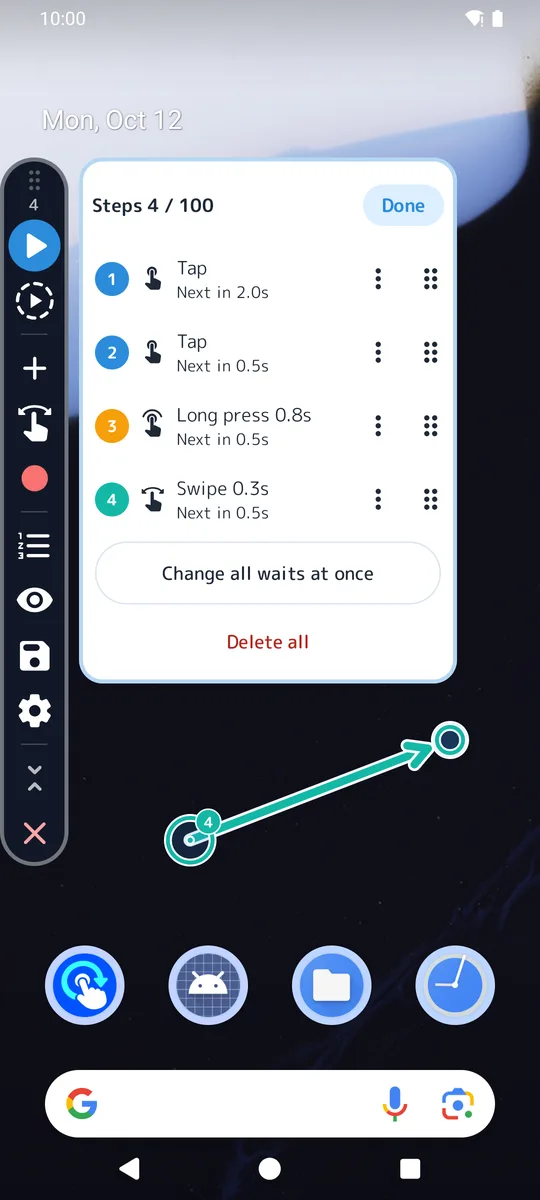
Every step in one list
- Reorder steps by dragging
- Turn a step off for now without deleting it
- Duplicate steps, or change every wait at once
- Preview the order and places without tapping anything
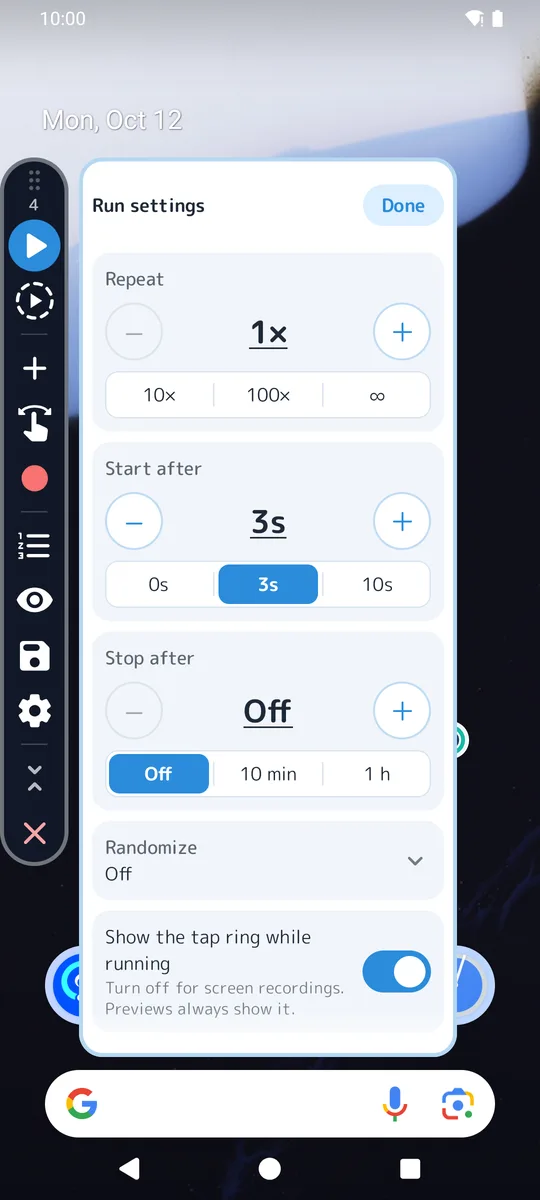
Repeats, timing and a little randomness
- Repeat a set number of times, or forever
- A countdown before it starts
- Stop after a time limit (pauses don't count)
- Vary each position and wait a little at random
No ads while you work, and safe stops
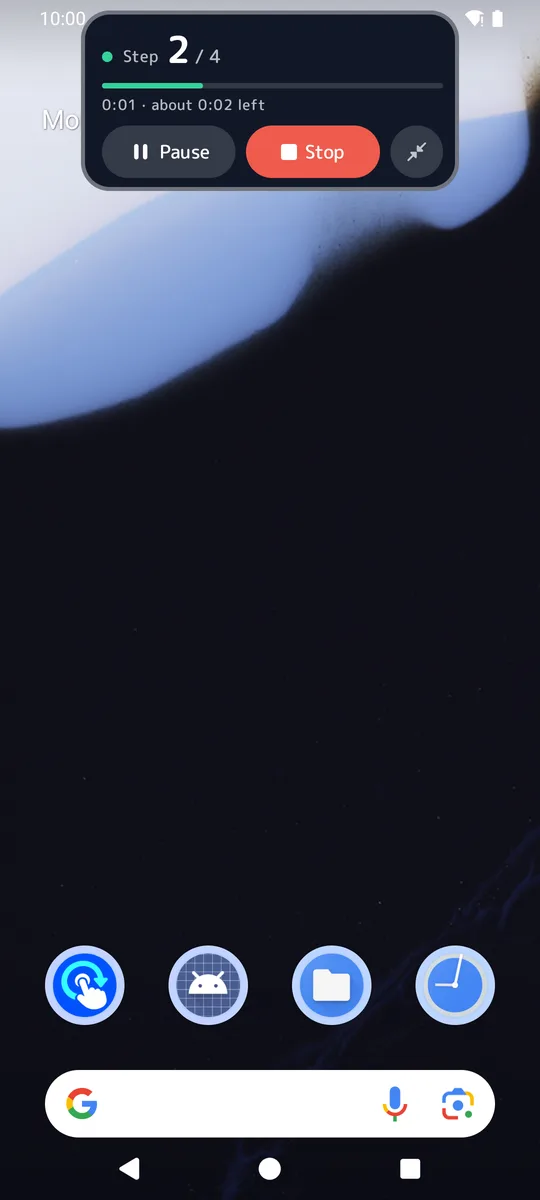
The control panel and running automations never show ads. While it runs, a small bar shows the step and lets you pause or stop at any time.
- Stops if another app comes to the front (an advanced setting can change this)
- Stops when the screen turns off, locks or rotates
- Never taps Nagi Clicker's own screens
At a glance
| Works on | Android 12 or later (phones and tablets) |
|---|---|
| Price | Free — every feature. Supported by ads. |
| Remove ads | One-time in-app purchase, not a subscription. The price is shown in Google Play. |
| Ads | A banner on the app's own screens, and an ad when you open the app (at most once every 5 minutes). None in the control panel or while an automation runs. |
| Permissions | Accessibility (to perform the taps you placed) and display over other apps (to show the panel) |
| Your automations | Saved on your phone. You can export them to a file. |
| Account / root | Neither is needed |
| Languages | English, Japanese |
| Availability | In final preparation for Google Play |
Good for
Tapping one button many times
Rapid tap one spot, with a count or a time limit.
A fixed series of taps
Daily check-ins, flipping through pages, entering the same steps every time.
Holding and swiping
Long presses and curved swipes mixed with taps, in the order you set.
Please check the terms of the apps, games and services you use with an auto clicker.
Start in three steps
Allow two permissions
Accessibility (to tap for you) and display over other apps (to show the panel). The app shows you where.
Place your steps
Open the app you want to automate, then add taps and swipes from the panel, or record them.
Press ▶
Preview first if you like. Save it to use again with one tap.
Everything it does
- Taps, long presses and curved swipes, in order
- Rapid tap, as fast as every 0.05 seconds
- Record your own touches as steps
- Preview without tapping
- Repeat count or infinite, start delay, time limit
- Randomize position and interval
- Step list: reorder, skip, duplicate, set all waits
- Save automations; reorder your saved list
- Home screen shortcut: wait for ▶ or start right away
- Open the target app automatically
- Export and import, for a new phone or a backup
- Five theme colors and dark mode
- A guide to every button, in the app
- English and Japanese
Free, with fair ads
Every feature is free to use. The app is supported by ads, which stay out of the way of your work.
Where ads appear
A banner on the app's own screens, and an ad when you open the app — at most once every five minutes. Never in the control panel or while an automation runs.
3 hours without ads
Watch one ad in Settings and both the banner and the opening ad go away for three hours.
Remove ads for good
A one-time purchase, not a subscription. Google Play shows the price in your currency. It comes back automatically on a new phone with the same Google account.
What Accessibility is used for
Android lets an app tap for you only through its Accessibility service. Nagi Clicker uses it only to:
- perform the taps, long presses and swipes you placed
- check which app is in front (its name only), so a run stops safely when the app changes
It does not read what is on the screen, and it does not collect or send personal information. You can turn it off at any time in Android's settings. Privacy policy
Questions
Does it work without root?
Yes. It uses Android's Accessibility service, which any app can ask you to turn on.
Why did my automation stop by itself?
For safety it stops when another app comes to the front, or the screen turns off, locks or rotates. The panel tells you the reason.
Will I lose my purchase on a new phone?
No. Sign in with the same Google account and the purchase comes back by itself.